Multiple Numbers, One Account
Manage multiple WhatsApp Business numbers from a single dashboard.
- Connect up to 5 numbers
- Separate campaigns, templates, and inboxes
- Switch numbers instantly

Send campaigns from your own WhatsApp Business numbers, see what happened to every single message, and pick up the replies in one inbox. Built on Meta's official Cloud API.
7 days free — 500 contacts and 100 MB of media storage. No card needed, and nothing starts charging on its own when it ends.
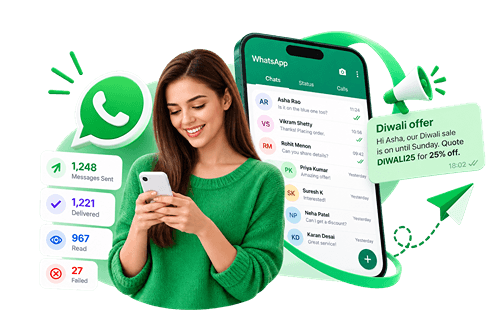
From contacts and campaigns to conversations, leads, and reports—all in one place.
Manage multiple WhatsApp Business numbers from a single dashboard.
Manage your entire audience in one place.

Create, personalise, schedule, and track campaigns with confidence.
Turn campaign replies into real conversations.
Capture and manage opportunities automatically.
The moment somebody replies, they stop being a row in a spreadsheet and become a lead — with a stage, a follow-up date, a priority and a timeline of everything said since. Work them on a board or in a table, whichever suits the day.
Your pipeline, out of the box
Rename them, recolour them, reorder them or add your own — the pipeline is yours, not a fixed funnel.
4 steps. The longest part is waiting for Meta to approve your first template.
Paste the 4 values from your Meta app — WhatsApp Business Account ID, Phone Number ID, a permanent access token and your app secret. They are checked against Meta before anything is saved, so a connected number is one that works.
Upload a spreadsheet and map the columns, or add people one at a time. Numbers are normalised to international format, duplicates are merged, and you can sort everyone into groups as you go.
WhatsApp only lets a business start a conversation with wording Meta has reviewed. Write it here, preview it as it will arrive, and submit — the status updates itself when the verdict comes back.
Choose the audience, see exactly how many people that is, and send. Delivery and read receipts arrive back per recipient, and replies open in the inbox.
Every part of the tool is available from the moment you connect a number.
Write a template, preview it as a message, and submit it to Meta for review without leaving the page.
Sent, delivered and read recorded per recipient from WhatsApp’s own receipts.
Failures grouped by what you can do: retry it, fix it, or stop trying that number.
A customer who replies STOP is removed from the queue immediately, not at the next campaign.
Queue a campaign for a date and time and let the worker pick it up.
Set a ceiling per number. Sending pauses when it is reached and resumes the next day.
Answer common questions on keywords, and greet anyone messaging for the first time.
Delivery funnel, reply rates, contact growth and per-number performance over any date range.
Your Meta access token is stored encrypted and is never sent back to the browser.
Tag a contact as many ways as you need, then target or exclude those tags when you build an audience.
Photos, video, documents and voice notes, checked against Meta’s size and format rules before they are sent.
Campaign reports, contacts, leads and analytics out as CSV, or a formatted PDF report.
This is not an automation layer driving a phone in the background. It talks to Meta's WhatsApp Cloud API with credentials you generate yourself, which is what keeps your number in good standing and your delivery receipts real.
Anywhere a message on WhatsApp gets read and an email does not.
Order updates, restock alerts and seasonal offers to customers who already buy from you.
Appointment reminders that people actually read, with replies handled in the same thread.
Run separate numbers for separate clients, with one contact book and one place to report from.
Batch announcements, fee reminders and enrolment follow-ups without a WhatsApp group.
We charge a flat fee for the software and nothing else. Meta bills its message charges to your own Meta account, and you pay them there.
One plan. Everything in the tool.
₹1,000/ month
Need more than this?
More contacts or more storage is a conversation, not a bigger button. Tell us the numbers and we will quote them.
Meta charges per delivered template message, priced by where the recipient is.
A · SoftTechLab platform
B · WhatsApp / Meta API
per month · Meta's share converted at ≈₹88/$1
This is not one bill. SoftTechLab only charges you A — the ₹1,000 platform fee. B goes to Meta, not to us: WhatsApp message charges are billed to your own Meta account and paid there, on the payment method you set up in Meta Business Manager. We never see that money and add nothing to it.
What this estimate does not charge you for
From 1 October 2026 Meta begins charging for service messages, and for utility templates sent in reply inside the 24-hour window. Rates for those were not published when this estimate was built, so they are not included below.
Meta's figures are an estimate, based on its rate card effective 1 July 2026, and exclude taxes and any volume discounts Meta applies to utility messages — so the real bill tends to come in at or below this. Your actual charges come from Meta. Check Meta's current rates
Yes. This tool connects to your own WhatsApp Business account through Meta’s official Cloud API, using credentials you generate in your own Meta app. Nothing is sent through a shared number, so your business name and quality rating stay yours.
Meta does, directly to the account you connect. We do not resell messages or add a per-message markup — you see the same rates Meta publishes, billed by Meta.
That is WhatsApp’s rule, not ours. A business may only start a conversation with a message Meta has reviewed. Once a customer replies, you have 24 hours to answer freely in the inbox — after that, you are back to templates.
5 by default. Templates, campaigns, the inbox and auto-replies belong to a single number each, because Meta scopes templates to one WhatsApp Business Account. Your contacts are shared across all of them.
They are unsubscribed straight away and pulled out of any campaign still in the queue, not just excluded from the next one. You can see and reverse that on the contact if it was a mistake.
Yes — .xlsx, .xls and .csv. You map the columns yourself, and the preview shows exactly how each number will be stored before anything is written. Numbers already in your list are updated rather than duplicated.
Every failure is recorded against the recipient with Meta’s reason translated into plain language, and grouped by what to do about it: retry it, fix something first, or stop trying that number. Numbers WhatsApp calls undeliverable are flagged so future campaigns skip them.
It is encrypted with AES-256-GCM before it is stored and is never returned to the browser — the interface only ever shows the last 4 characters so you can tell which token is in place.
Connect your WhatsApp Business number, import your contacts, and send a campaign you can actually measure. Free for 7 days, no card needed.